A component-based TUI framework for Go with cached rendering, line-level diffing, and a single UI goroutine.
$ go get github.com/vito/tuist
A high-performance TUI framework for Go.
go get github.com/vito/tuist@latest
# interactive selector
$ go run github.com/vito/tuist/demos@latest

# or run one directly
$ go run github.com/vito/tuist/demos@latest keygen   # mandelbrot fractal, inline editors
$ go run github.com/vito/tuist/demos@latest grid     # mouse hover/click grid, keyboard nav
$ go run github.com/vito/tuist/demos@latest logs     # scrollback stress test, overlays, spinner
tui.CompoOnMount, OnDismount)SetHovered, SetFocused)HandleKeyPress, HandlePaste, HandleMouse)Compo.Update is calledUsed LLMs heavily. It wrote the commits, I write the docs.
type Counter struct {
    // All components embed tuist.Compo.
    tuist.Compo
    // Components store state however they like (public or private).
    Count int
}

// All components implement Render, writing output via the context.
func (c *Counter) Render(ctx tuist.Context) {
    ctx.Line(fmt.Sprintf("Count: %d", c.Count))
}

var _ tuist.Interactive = (*Counter)(nil)

// Interactive components handle keypresses. See [interfaces].
func (c *Counter) HandleKeyPress(_ tuist.Context, ev uv.KeyPressEvent) bool {
    c.Count++
    c.Update()
    return true
}

func main() {
    tui := tuist.New(tuist.NewStdTerminal())
    // Start the rendering + dispatch loop
    tui.Start()
    // Queue some updates for the UI goroutine.
    tui.Dispatch(func() {
        counter := &Counter{}
        tui.AddChild(counter)
        tui.SetFocus(counter)
    })
}
Embedding Compo provides bookkeeping for the component in the UI tree. Each component has a generation, a parent, and children.
Calling Update() increments the generation and propagates upward. On each frame, Tuist only calls Render() for components whose generation is higher than last render.
Render() writes output lines into a framework-owned buffer via ctx.Line(), ctx.Lines(), and optionally sets a cursor with ctx.SetCursor(). Tuist only renders lines that changed from the last frame. If the lines are offscreen, Tuist has to do a full repaint, but does so using synchronized output (DEC 2026) so it won't flicker.
To avoid a sprawl of mutexes, Tuist provides Dispatch() for scheduling updates in the frame rendering loop, where they will be coalesced, followed by a single render:
func (t *TUI) runLoop() {
    for {
        select {
        case ev := <-t.eventCh:    // decoded terminal input
            t.dispatchEvent(ev)
        case <-t.dispatchCh:       // closures from Dispatch()
            t.drainDispatchQ()
        case <-t.renderCh:         // render request
        }
        t.drainAll()             // coalesce rapid events
        t.doRender()             // render tree → diff → write deltas
    }
}
Components only need to implement Render. Everything else is opt-in:
// Every component must embed Compo and implement Render.
// Render writes output via ctx.Line(), ctx.Lines(), and ctx.SetCursor().
type Component interface {
    Render(ctx Context)
}

// Keyboard input. Events bubble up the parent chain if handler returns false.
type Interactive interface {
    HandleKeyPress(ctx Context, ev uv.KeyPressEvent) bool
}

// Mouse events with component-relative coordinates. Positional dispatch via zone markers.
type MouseEnabled interface {
    HandleMouse(ctx Context, ev MouseEvent) bool
}

// Lifecycle. Mount context is cancelled on dismount — use it to bound goroutines.
type Mounter    interface { OnMount(ctx Context) }
type Dismounter interface { OnDismount() }

// Focus/hover state notifications.
type Focusable  interface { SetFocused(ctx Context, bool) }
type Hoverable  interface { SetHovered(ctx Context, bool) }

// Bracketed paste.
type Pasteable  interface { HandlePaste(ctx Context, ev uv.PasteEvent) bool }
Compose components together by calling RenderChild() in the parent component's Render() function.
// Vertical stack — Container does this internally.
// RenderChild appends the child's output directly to the parent's buffer.
func (c *MyLayout) Render(ctx tuist.Context) {
    for _, child := range c.children {
        c.RenderChild(ctx, child)
    }
}

// With adjusted constraints — ctx.Resize returns a copy with new Width/Height.
// RenderChildResult returns output without appending, for transforming it.
func (b *Border) Render(ctx tuist.Context) {
    inner := b.RenderChildResult(ctx.Resize(ctx.Width-2, ctx.Height-2), b.child)
    // ... wrap inner.Lines with border chrome, then ctx.Lines(...)
}

// Inline — for embedding a child within a single line (e.g. a clickable value in a status bar)
func (c *Chrome) Render(ctx tuist.Context) {
    re := c.RenderChildInline(ctx, c.reInput)  // returns string, zones auto-wired
    im := c.RenderChildInline(ctx, c.imInput)
    ctx.Line("re " + re + "  im " + im)
}
RenderChild handles all the bookkeeping:
Update() propagates up the component tree.MouseEnabled, its output is wrapped with "zone markers" for detecting and dispatching mouse events.OnMount() is called.OnDismount() is called.Use goroutines like you normally would, and use Dispatch() to queue component tree updates for the frame render loop:
func (w *Widget) OnMount(ctx tuist.Context) {
    go func() {
        data, err := fetchData(ctx)  // ctx.Done() fires on dismount
        if err != nil { return }
        ctx.Dispatch(func() {
            w.data = data
            w.Update()
        })
    }()
}
Tuist is the source of truth for keyboard focus. Focused() returns the component that currently owns input, and IsFocused(component) checks its identity. Components can use ctx.IsFocused() during framework callbacks. Like other component state, these methods must be used on the UI goroutine.
Use PushFocus() when presenting temporary UI. Its handle restores the focus owner that was active before the temporary component appeared:
tui.AddChild(dialog)
focus := tui.PushFocus(dialog)

// When the dialog is dismissed, restore focus before removing it.
focus.Restore()
tui.RemoveChild(dialog)
Focus scopes may be nested. Restoring an older scope while a newer one is active is safe: restoration waits until the newer scope closes. Explicitly removing a focused component, one of its ancestors, or a focused overlay also clears focus, preventing input from being routed to dismissed UI.
Overlays allow components like floating menus and notification bubbles to render over the base content. They can be positioned relative to the viewport, the full content, or the cursor.
// Centered modal
handle := ctx.ShowOverlay(dialog, &tuist.OverlayOptions{
    Width:  tuist.SizePct(50),
    Anchor: tuist.AnchorCenter,
})

// Completion menu that follows the cursor, flips above/below as needed
handle := ctx.ShowOverlay(menu, &tuist.OverlayOptions{
    CursorRelative: true,
    PreferAbove:    true,
    CursorGroup:    group, // linked overlays share the above/below decision
})

handle.Remove()            // remove permanently
handle.SetHidden(true)     // toggle visibility
handle.SetOptions(newOpts) // reposition without recreating
Container — renders children sequentially in a vertical stack. This is the starting point: TUI embeds it, and you call AddChild/RemoveChild to go from there.
Slot — holds one replaceable child. Set(child) swaps it.
Spinner — animated spinner.
TextInput — (supposed-to-be) full-featured editing prompt, with built-in completion and ghost suggestions.
CompletionMenu — fancy dropdown autocomplete wired to a TextInput.
Components implement MouseEnabled to handle mouse hover/click events. Mouse support is integrated into the rendering and event pipeline, automatically adding "zone markers" to a component's output and performing hit detection to route events to the right component.
Tuist counts how many components implement MouseEnabled and emits the proper terminal sequences to enable/disable mouse support automatically.
func (c *Cell) HandleMouse(ctx tuist.Context, ev tuist.MouseEvent) bool {
    switch ev.MouseEvent.(type) {
    case uv.MouseClickEvent:
        ctx.SetFocus(c)
        return true
    case uv.MouseMotionEvent:
        c.cursorRow, c.cursorCol = ev.Row, ev.Col  // component-relative
        c.Update()
        return true
    }
    return false
}
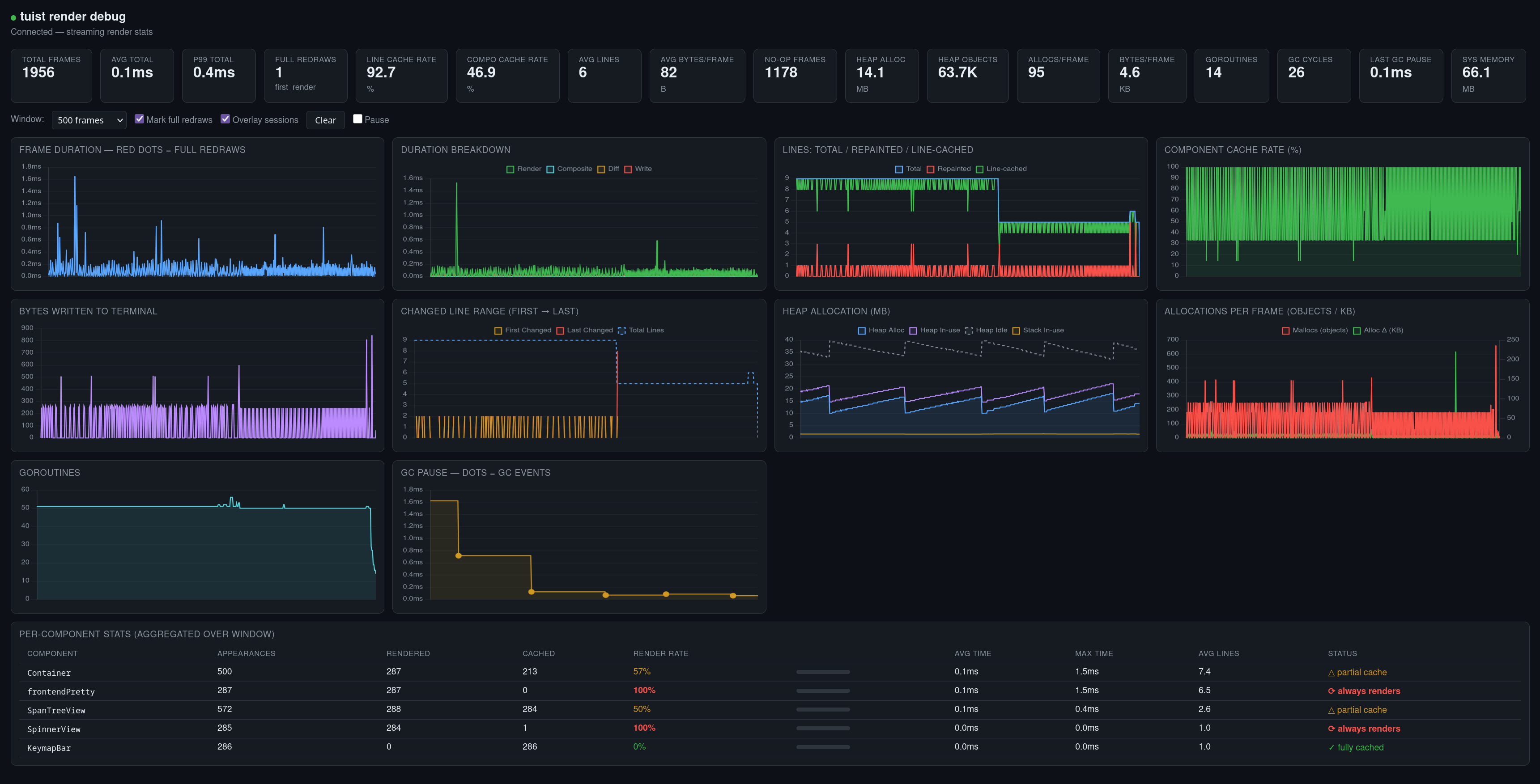
Tuist has a quick-and-dirty debug UI that can help you chase down cache busts and performance issues.
go run github.com/vito/tuist/debugui@latest -f /tmp/tuist.log # default
Wrap your command in TUIST_LOG=/tmp/tuist.log and you'll see metrics stream in: